

Ask before you assume. Keep every answer with the job.
A question you never asked becomes an assumption in your number. The RFI log keeps every question for the job, who it went to, when the answer is due and what came back.
Open questions at bid time are offered as draft clarifications for the proposal, and you decide what prints.
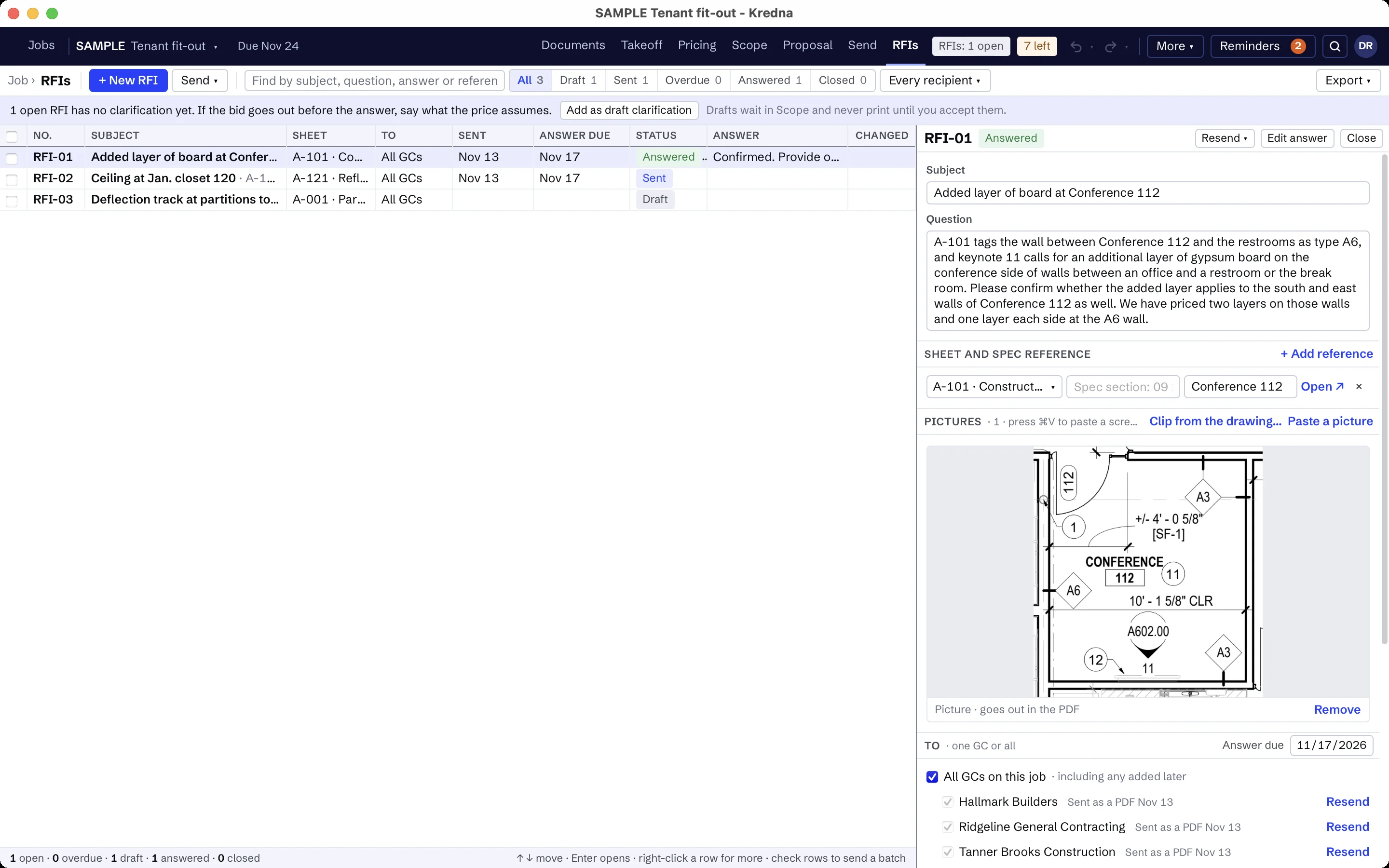
Write the question where you found it.
Each RFI has its number, the question and what you will assume if nobody answers, the sheet and spec reference with a clip of the drawing, its recipient GCs, the date sent and the answer due.
Send one, or a batch.
Check the RFIs to send and each GC gets its own numbered PDF, saved in the job folder or attached to a draft email in your mail app. Follow up the same way when an answer is late.
Track every answer.
Status runs Draft, Sent, Answered and Closed. Filter for overdue answers and see the log by status or by recipient.
Record the answer as the GC gave it, with its source, and link it to what it changed: an exclusion, a clarification, an item or a takeoff.
No silent assumptions on the proposal.
An RFI still open at bid time is offered as a draft clarification for the proposal. You accept or edit it. It never becomes a proposal assumption on its own.